Describe the bug
If you spawn a Player Object explicitly like this:
newPlayer.SpawnAsPlayerObject(clientId, null, true);
It will clean up if the player disconnects. But if the server force-ends the client connection via DisconnectClient, the object is left hanging around.
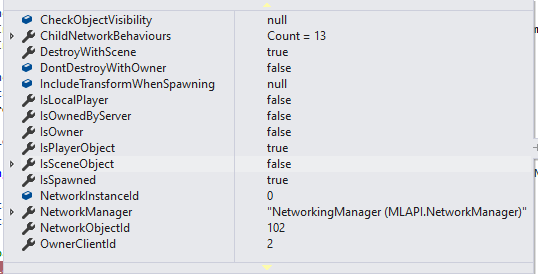
(state of NetworkObject after creation--note it is owned by "client 2" which is the connecting client).
To Reproduce
Steps to reproduce the behavior:
- In the BossRoom demo, comment out the
netObj.Despawn(true) statement in ServerGameNetPortal.BootClient.
- In the BossRoom demo build a non-development client.
- Start one host and go all the way into game.
- Start two joiner clients and have them late-join to the host.
- Observe that the 2nd connection kicks the 1st connection (per our design in BossRoom not to let the same GUID connect twice), but that the 1st connection's character is still hanging around.
Actual outcome
Player object of severed client connection is left behind on host.
Expected outcome
Player object of severed client connection is cleaned up regardless of whether by client disconnect, or server calling DisconnectClient.
Screenshots
If applicable, add screenshots to help explain your problem.
Environment (please complete the following information):
- OS: Windows 10
- Unity Version: 2020.3.0f1
MLAPI Version: 0.1.0
- MLAPI Commit: tag release/0.1.0
Additional context
Add any other context about the problem here. Logs, code snippets would be useful here but please also consider attaching a minimal Unity project that reproduces the issue.


Describe the bug
If you spawn a Player Object explicitly like this:
newPlayer.SpawnAsPlayerObject(clientId, null, true);It will clean up if the player disconnects. But if the server force-ends the client connection via
DisconnectClient, the object is left hanging around.(state of NetworkObject after creation--note it is owned by "client 2" which is the connecting client).
To Reproduce
Steps to reproduce the behavior:
netObj.Despawn(true)statement in ServerGameNetPortal.BootClient.Actual outcome
Player object of severed client connection is left behind on host.
Expected outcome
Player object of severed client connection is cleaned up regardless of whether by client disconnect, or server calling
DisconnectClient.Screenshots
If applicable, add screenshots to help explain your problem.
Environment (please complete the following information):
MLAPI Version: 0.1.0
Additional context
Add any other context about the problem here. Logs, code snippets would be useful here but please also consider attaching a minimal Unity project that reproduces the issue.